This is phenomenal! I just found out about the OG LPC but noticed some clothing/items weren't exported properly on certain animations (leaving my NPC's a bit... unclothed).
Tried this out and everything has been going very well! Do you think we'll be able to export a zip folder with animations broken out sometime in the future?
I'm seeing a scaling bug where almost all weapons (e.g., Boomerang) are exporting at a tiny size in the RPG Maker layout, while the Dagger and Axe scale correctly.
It seems most weapons are missing the necessary internal flag to be classified as 'large'.
Could you please review the weapon definitions to ensure all assets intended for the large size are correctly flagged as 'large'?
The large flag means that the sprites of the character+weapon doesn't fit in the 64x64 size. In those cases the application fits the images in a 192x192 sprite.
This way the boomerang is a large weapon and the axe isn't.
This was me trying to not waste so much video memory. In the chargen I accomodate both sprites sizes by changing it's center position.
If this is not an option for you, you can try to change the parameter "export_large_sheets" to "always".
This will always export images sized like the boomerang ones, but at least it will be in a consistent size.
Thanks for explaining that! Makes a lot more sense now. I’ll give the export_large_sheets option a try and see how it goes. Really appreciate you taking the time to help, and I’m looking forward to future updates.
I toyed with the ideia when I made the pallete parameters some time ago, but it required such a long list of parameters that I thought it was unmanageable. I ended up scraping the idea.
If I think of some elegant way of doing it I'll sure implement it.
Hello! I would like to ask if it’s possible to use my own assets, for example the base doll, and the rest like hair, colors, shirts, pants, etc. I don’t want to use the default assets. I checked the comments but couldn’t find an answer to this, so I’m asking here. Thank you very much!
However, if you want to completly replace the LPC assets by your own, some care must be taken (and because I have never tested it, it might just not work).
From the top of my head, the exporter code still has some 64 and 192 constants in it (so your assets should ideally 64x64 px).
Also the app assumes the LPC animations (idle, walk, slash, thrust, shoot, cast, hurt), so I fear that can be a big restriction to you.
im not sure if i'm extremely dumb or something, but where is the link to access the thing shown in the images? I know the last link brings you to a white website but eery character i make on the website is always naked in half of the animations no matter what clothes i put on them, so i asked chat gpt and they said to go to this on itch.io but i dont know if there is a seperate website like the one shown in the pictures or if this leads back to the white one? sorry i feel like im missing something, thanks!
this is going to sound VERY weird... I have a tileset that's 10000x10000 with each 'frame' being 200x200, DOES this software have the ability to...
Allow for custom character sets. Not choke on files that size. allow me into the backend to set categories and perhaps hues... That's not a dig on your software, most other sprite collations can't do it either.
This means that you can only arrange each frame wherever you need it to be in the spritesheet (since the frame size is fized, this is kinda of semi-custamizable. That could be done, but it would no longer be a LPC Character Generator)
You can place several animations in the same spritesheet, and that's the closest thing you get regarding categories.
Regarding color, if you are trying to have, for instance, several walking animations with different hues in the same spritesheet,that's not supported.
If you need a character to colorize in game, maybe using the grayscale palette option will work for you.
Regarding the size you the spritesheets, I don't know yet. I've been trying to reduce it has much as I can, because I have a potatoe PC, but your question got me really curious. I guess I'll try to create a spritesheet that large, with many repeated frames and a very fast animation speed, to see how it goes (I don't hold much hope though).
The dimensions are weird. The spritesheet for a goblin from "Wood's Fine RPG Paper Maker assets" is just 64x144, and it contains a total of 36 animations.
This is great! Do you have a github for this that people can see? I'm trying to organize my spritesheets from the LPC generator repo and it's a nightmare matching up what valid matches there are between sprites and animations and I'd love to see how you organized it to work like this.
I haven't made the repository public yet. This app has started has a by product of a game I was working on, and as such it's code is overcomplicated. I've wanted to clean it, for some time now.
In the meantime, if you open the pak file (it's just a zip) you can see how things are organized.
Look at the race files. They define what parts are used for each body.
Then look at the gear files. One of the fields of each gear definition is what body/head they can work with.
Excellent tool. This will really help me. I am having trouble getting the export to do what I want. My character has a shield in one hand and a sword in the other. I want to configure my layout to export the character holding nothing. The instructions in the release notes for version 0.7 indicate:
The next parameter, when present, defines what the character is holding (if not set, value 1 is used).
Thank you for the really fast response (good to see). I love the fact that I can control the export. I do need to figure out a way to merge the exports because in my game I want to have the players acquire the weapons and that means they will have multiple weapons, and I will need to control when they use them. So, I would like to have one sprite sheet with multiple weapons in it, but I will use something like Aesprite to merge the sheets. Excellent work on your app. You did a wonderful job and a great service to the gaming community.
First of all amazing tools, it will help me a lot :)
I have a small question : When I exported a character to test, I realized that there is not the idle animation in the export or maybe i don't see it...
Just to be sure, if I use the sprites created from this software on my game, can I use them for Commercial use if I credit everyone who helped contribute on it? Thank you!
Hi, I hope you're doing well. It's an incredible tool. I don't know if you've been asked this question before, but will it be possible to add ears, animal tails, horns, etc. to the human race in the future?
That is possible and one of the easing things to mod in the editor.
First I suggest you read Devlog v0.2. It explains how the application loads it's resources.
With that knowledge, you can extract everything from "chargen.pak", and edit the file "data/character/race/human.race" to add the pieces you want. For instance, if you add the line
"tail": [ "none", "cattail" ],
to the "m1" configuration, then regular human males can have a cat tail.
After that there's no need to repack the assets in a new .pak file. Just place the "human.race" file in the folder "<base>/data/data/character/race" and the application will use the human race definition instead of the one inside the .pak file.
Note 1: To discover the id's of the pieces you want you need the open the json files in the "data/character/..." folders.
Note 2: Some pieces aren't configured to work on some bodies (because they don't fit well). If you still want to use them, you will also need to edit those pieces json files.
Hi, great tool. Hovewer, when separate files are generated they contains idle animation, but universal ones does not (despite fact that it's main animation in preview so it should work). Can it be fixed?
← Return to tool
Comments
Log in with itch.io to leave a comment.
This is phenomenal! I just found out about the OG LPC but noticed some clothing/items weren't exported properly on certain animations (leaving my NPC's a bit... unclothed).
Tried this out and everything has been going very well! Do you think we'll be able to export a zip folder with animations broken out sometime in the future?
Hello,
I'm seeing a scaling bug where almost all weapons (e.g., Boomerang) are exporting at a tiny size in the RPG Maker layout, while the Dagger and Axe scale correctly.
It seems most weapons are missing the necessary internal flag to be classified as 'large'.
Could you please review the weapon definitions to ensure all assets intended for the large size are correctly flagged as 'large'?
Thank you!
Things are actually a little different.
The large flag means that the sprites of the character+weapon doesn't fit in the 64x64 size. In those cases the application fits the images in a 192x192 sprite.
This way the boomerang is a large weapon and the axe isn't.
This was me trying to not waste so much video memory. In the chargen I accomodate both sprites sizes by changing it's center position.
If this is not an option for you, you can try to change the parameter "export_large_sheets" to "always".
This will always export images sized like the boomerang ones, but at least it will be in a consistent size.
Hope this helped.
Thanks for explaining that! Makes a lot more sense now. I’ll give the
export_large_sheetsoption a try and see how it goes. Really appreciate you taking the time to help, and I’m looking forward to future updates.Is there a way to call the executable with parameters to generate sheets using the cli?
Unfortunatly no.
I toyed with the ideia when I made the pallete parameters some time ago, but it required such a long list of parameters that I thought it was unmanageable. I ended up scraping the idea.
If I think of some elegant way of doing it I'll sure implement it.
Would be great to be able to disable body and face-addons in order to export different hairstyles only.
Hello! I would like to ask if it’s possible to use my own assets, for example the base doll, and the rest like hair, colors, shirts, pants, etc. I don’t want to use the default assets. I checked the comments but couldn’t find an answer to this, so I’m asking here. Thank you very much!
Please check my answer to the post
https://itch.io/post/12636571
However, if you want to completly replace the LPC assets by your own, some care must be taken (and because I have never tested it, it might just not work).
From the top of my head, the exporter code still has some 64 and 192 constants in it (so your assets should ideally 64x64 px).
Also the app assumes the LPC animations (idle, walk, slash, thrust, shoot, cast, hurt), so I fear that can be a big restriction to you.
im not sure if i'm extremely dumb or something, but where is the link to access the thing shown in the images? I know the last link brings you to a white website but eery character i make on the website is always naked in half of the animations no matter what clothes i put on them, so i asked chat gpt and they said to go to this on itch.io but i dont know if there is a seperate website like the one shown in the pictures or if this leads back to the white one? sorry i feel like im missing something, thanks!
If I correctly understood your problem, you need to scroll down the page until you see the area I highlight in the screenshot bellow.
Btw, I had no ideia ChatGPT would recomend this app. :)
Completely uncompatible with Debian.
Maybe this was created\built on Arch\Fedora
You are right. It was built on Arch.
I assumed the appimage would work on major distros. I'll try to get my hands on an old pc and install Debian..
Thanks for the info.
You can make it compatible including in the AppImage libc and other libraries used!
Any update on this? I'd love to get it working on Linux Mint.
I built new a new appimage and archive version of the application. Hope it works now.
this is going to sound VERY weird... I have a tileset that's 10000x10000 with each 'frame' being 200x200, DOES this software have the ability to...
Allow for custom character sets.
Not choke on files that size.
allow me into the backend to set categories and perhaps hues...
That's not a dig on your software, most other sprite collations can't do it either.
Hmmm....
It allows for custom spritesheets, BUT...
it expects each frame to be 64x64 or 192x192.
This means that you can only arrange each frame wherever you need it to be in the spritesheet (since the frame size is fized, this is kinda of semi-custamizable. That could be done, but it would no longer be a LPC Character Generator)
You can place several animations in the same spritesheet, and that's the closest thing you get regarding categories.
Regarding color, if you are trying to have, for instance, several walking animations with different hues in the same spritesheet,that's not supported.
If you need a character to colorize in game, maybe using the grayscale palette option will work for you.
Regarding the size you the spritesheets, I don't know yet. I've been trying to reduce it has much as I can, because I have a potatoe PC, but your question got me really curious. I guess I'll try to create a spritesheet that large, with many repeated frames and a very fast animation speed, to see how it goes (I don't hold much hope though).
Could we get animations for attacks with legs moving ,
Sorry, no.
The animations you get are the ones created by so many great artists that contributed to the LPC project.
It's way out of my reach to try to create new animations (that would mean updating most existing gear and clothing).
Hi there! Is this software compatible with "Rpg Paper Marker"? Thanks in advance :)
I don't know yet.
If you tell me the layout of the character spritesheets for "RPG Paper Maker", then probably the app can export with that layout.
I've checked the game engine site, but couldn't find and answer.
The dimensions are weird. The spritesheet for a goblin from "Wood's Fine RPG Paper Maker assets" is just 64x144, and it contains a total of 36 animations.
Exactly. I also checked that asset pack and couldn't reach a conclusion.
if, while using the engine you come to an answer, share it here and I'll make an export layout for it.
I'll try but I fear it might be a lost cause. "Create your own sprites" is the Achilles' Heel of that engine.
This is great! Do you have a github for this that people can see? I'm trying to organize my spritesheets from the LPC generator repo and it's a nightmare matching up what valid matches there are between sprites and animations and I'd love to see how you organized it to work like this.
I haven't made the repository public yet. This app has started has a by product of a game I was working on, and as such it's code is overcomplicated. I've wanted to clean it, for some time now.
In the meantime, if you open the pak file (it's just a zip) you can see how things are organized.
Look at the race files. They define what parts are used for each body.
Then look at the gear files. One of the fields of each gear definition is what body/head they can work with.
Hope this helps for now.
Excellent tool. This will really help me. I am having trouble getting the export to do what I want. My character has a shield in one hand and a sword in the other. I want to configure my layout to export the character holding nothing. The instructions in the release notes for version 0.7 indicate:
I am using the following:
[ "WLK_DN_0_0", "WLK_DN_0_1", "WLK_DN_0_2", "WLK_DN_0_3", "WLK_DN_0_4", "WLK_DN_0_5", "WLK_DN_0_6", "WLK_DN_0_7"]
Indeed, it exports without the sword, but with the shield. Am I missing something?
Thanks
Thanks for trying the app and extra thanks for reading the comments and trying to troubleshoot things yourself.
I've just check and you've done everything right. I on the other hand, have not (I'm not clearing the offhand slot).
Tomorrow I'll fix this this and push a new version. Sorry for the inconvenience.
Thank you for the really fast response (good to see). I love the fact that I can control the export. I do need to figure out a way to merge the exports because in my game I want to have the players acquire the weapons and that means they will have multiple weapons, and I will need to control when they use them. So, I would like to have one sprite sheet with multiple weapons in it, but I will use something like Aesprite to merge the sheets. Excellent work on your app. You did a wonderful job and a great service to the gaming community.
You're too kind. Thank you very much.
I've just published v0.9.3 that works correctly now.
Hey everyone,
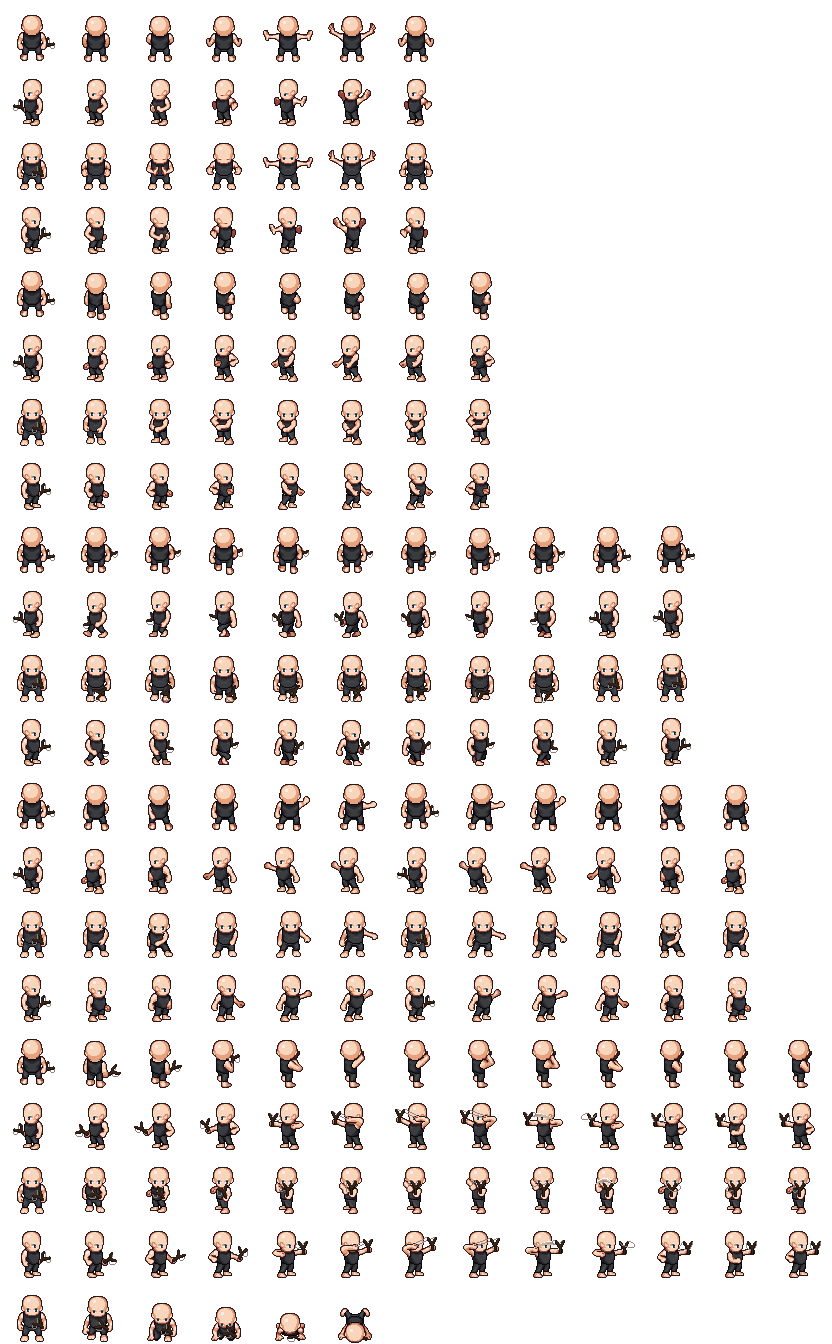
First of all amazing tools, it will help me a lot :)
I have a small question : When I exported a character to test, I realized that there is not the idle animation in the export or maybe i don't see it...
You can see the export in the photo under :
Thanks in advance :)
Glad you liked it.
The idle animation are the 2 frames after the walk animation (10 and 11 columns).
If you don't want/need a idle animations, you can use columns 1 or 10 (they are repeated).
Best of luck in your projects.
Hmm okay thanks a lot :)
Last question : What is your recommended fps for the animation ?
The animations you see in the app use the following times:
idle 750ms/frame
cast / walk / thrust / slash / hurt 75 ms/frame
shoot 60ms / frame
I don't claim these times as the best possible, but they can give you a starting point to experiment.
Just to be sure, if I use the sprites created from this software on my game, can I use them for Commercial use if I credit everyone who helped contribute on it? Thank you!
P.S.: Awesome software btw
I 've read the licenses descriptions several types, and that is also my understanding.
Heck, that was the reason I ended up choosing LPC assets.
That's for trying out the app.
Hi, I hope you're doing well. It's an incredible tool. I don't know if you've been asked this question before, but will it be possible to add ears, animal tails, horns, etc. to the human race in the future?
Hi, I have the same question.
It is possible in the original editor
Greetings.
That is possible and one of the easing things to mod in the editor.
First I suggest you read Devlog v0.2. It explains how the application loads it's resources.
With that knowledge, you can extract everything from "chargen.pak", and edit the file "data/character/race/human.race" to add the pieces you want. For instance, if you add the line
"tail": [ "none", "cattail" ],
to the "m1" configuration, then regular human males can have a cat tail.
After that there's no need to repack the assets in a new .pak file. Just place the "human.race" file in the folder "<base>/data/data/character/race" and the application will use the human race definition instead of the one inside the .pak file.
Note 1: To discover the id's of the pieces you want you need the open the json files in the "data/character/..." folders.
Note 2: Some pieces aren't configured to work on some bodies (because they don't fit well). If you still want to use them, you will also need to edit those pieces json files.
Have fun.
Perfect, thank you very much!
Hi, great tool. Hovewer, when separate files are generated they contains idle animation, but universal ones does not (despite fact that it's main animation in preview so it should work). Can it be fixed?
It is there.
Default universal lpc layout:
Default universal compact layout:
Have fun.